14 Life Notebook Sections Everyone Should Have

I have a confession. My first life notebook was a mess. I tried to put my whole life in it. Every thought, every list, every quote I liked. After two months, it was so full that I could not find a thing. So I stopped using it.
Then I learned something that made all the difference. A life notebook is not meant to hold every part of your life. It is meant to give the key stuff a home. A place you know to look, every time.
Think about your keys. If you put them in the same bowl each day, you never lose them. A life notebook does that for the info you need most. Dates, goals, plans, lists, and notes all have a set spot.
Now, a life notebook is not the same as other books you might keep. Here is a quick way to tell them apart:
- Life notebook: a home for the key info and plans that run your life. You use it to look things up and keep track.
- Journal: a place to think and write about your feelings and ideas.
- Planner: a book with dates, used to plan your days and weeks.
- Diary: a record of what happened each day.
Some people mix them, and that is fine. But it helps to know what each one does.
I like to call my life notebook my Personal Information Hub. It is the one place where the important parts of my life meet. In this post, I will walk you through the sections I think everyone should have. I will also tell you what to leave out, so your notebook stays clean and easy to use.
Before Creating Sections, Decide What Your Notebook Is For
Before you grab tabs and pens, stop and ask one question. What do I want this notebook to do for me?
Here are some common answers:
- Planning: I want to plan my weeks, months, and goals.
- Reference info: I want one place for things I need to look up, like sizes, dates, and contacts.
- Goal tracking: I want to see my goals and check my progress.
- Household: I want to keep my home running well.
- Reflection: I want to look back and learn from my months.
- All of the above: I want one book for it all.
Your answer shapes your sections. If you just want help with your home, you don’t need a goal section. If you want to plan, you need more planning pages.
The big rule is this: your sections should match your real needs. Not someone else’s. Not a pretty photo online. Yours.
It is fine to start small. You can always add a section later. It is much harder to fix a book stuffed with pages you never use.
Section 1: Life Dashboard
This is the first page I open, every time. It is like the dashboard in a car. One quick look tells you what is going on.
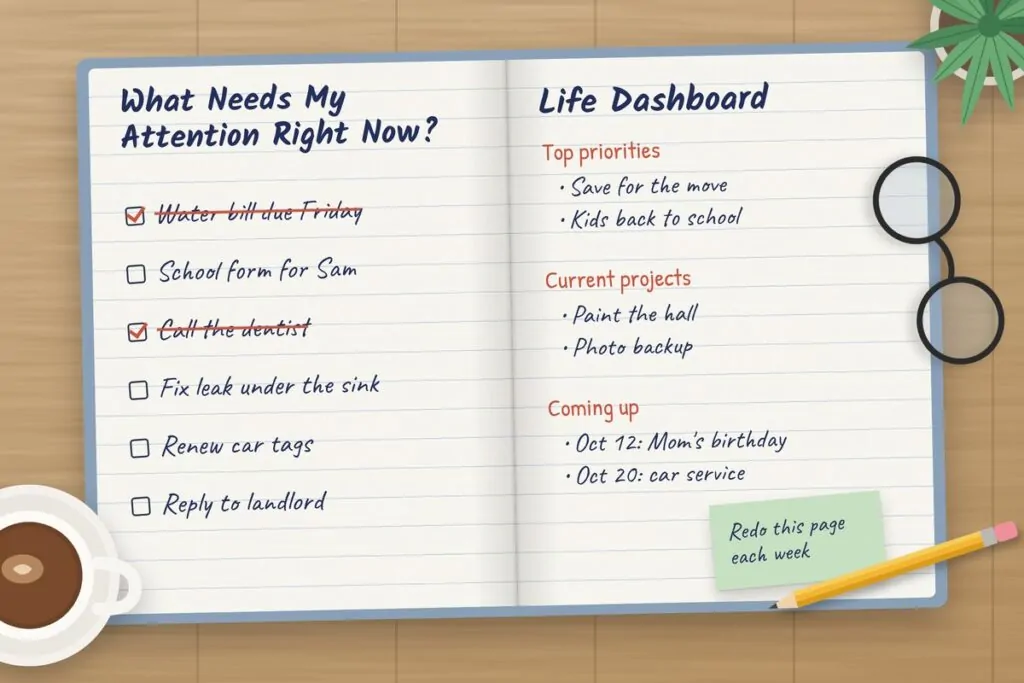
On my Life Dashboard, I keep:
- Current priorities: the top two or three things that matter most right now.
- Current projects: a short list of what I am working on.
- Important dates: what is coming up in the next few weeks.
- My focus: one word or line for this month.
- Things that need attention: stuff I can’t let slip.
Keep it short. One or two pages, max. If it gets long, it is not a dashboard anymore.
The “What Needs My Attention Right Now?” Page
This is my most loved page in the whole book. It is just one page with that question at the top.
Under it, I list the things that are on my mind and need care soon. A bill due Friday. A form for my kid’s school. A call I need to make. A leak under the sink.
When I feel lost or stressed, I go to this page. It tells me where to start. And when I finish something, I cross it off. That feels so good.
I redo this page each week, so it stays fresh.
Section 2: Current Goals
This section is for the goals you are working on right now. Not every goal you have ever had. Just the active ones.
For each goal, I write:
- The goal: what I want, in plain words.
- Why it matters: the reason I care. This helps on hard days.
- Next action: the very next small step.
- Deadline: when I want it done.
- Progress: where I am now. A few notes or a simple bar I fill in.
- Obstacles: what might get in the way, and how I can deal with it.
Here is a sample. Goal: save $1,000 for an emergency fund. Why: so I don’t panic when the car breaks. Next action: set up an auto transfer of $50 a week. Deadline: June 30. Obstacle: I tend to spend on take-out. Fix: cook at home three more nights a week.
One tip. This is not a place for quotes and dream boards. Those are nice, but they fill up the pages fast. Keep this section about real goals and real steps.
Section 3: Projects in Progress
A project is anything that takes more than one step to finish. Goals often turn into projects. But some projects are just jobs you need to get done.
For each project, I give it one page. On that page I write:
- Desired result: what does done look like?
- Next step: what is the very next thing to do?
- Waiting on: am I waiting for someone or something?
- Deadline: when does it need to be done?
- Notes: any key info, ideas, or links.
Some examples of projects:
- Moving to a new home.
- Building a website.
- Taking an online course.
- A home improvement job, like painting a room.
- Planning an event, like a birthday party.
When a project is done, I move the page to the back, or I take it out. That keeps this section about what is active right now.
Section 4: Important Dates
This section holds the dates you don’t want to miss. I keep it as a list by month, so I can see the whole year.
What to add:
- Birthdays: family, friends, and anyone you want to send a card to.
- Renewals: license, passport, car tags, insurance.
- Appointments: yearly check ups and visits.
- Annual events: anniversaries, school start dates, holidays.
- Deadlines: tax dates, school forms, work due dates.
- Seasonal reminders: swap clothes, check the heater, clean the gutters.
Now, an honest tip. Paper does not beep. Your notebook can’t remind you on the day. So the dates that really matter should also go in a phone or digital calendar with an alert.
I use the notebook to see the big picture of my year. I use the calendar to get the reminder. They work great as a team.
Section 5: Things I’m Waiting For
This is the section no one tells you about. And it is so useful.
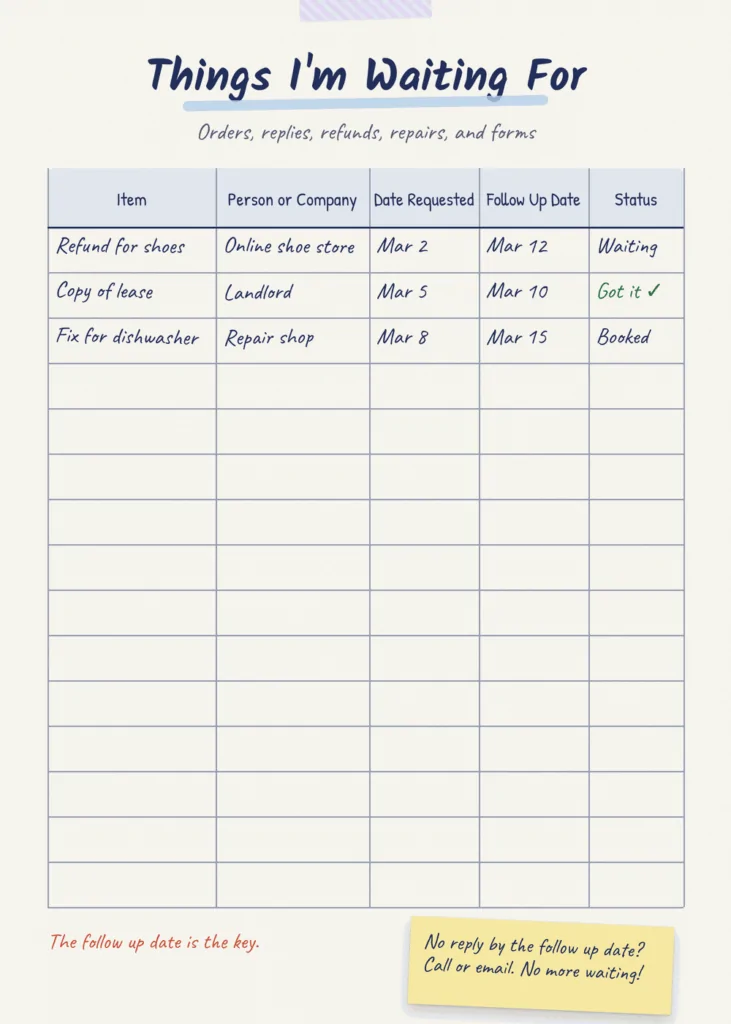
How often do you wait on something and then forget about it? An order that never came. An email no one answered. A refund that never showed up. It happens to me all the time. Or it did, before I made this page.
Here is what goes on it:
- Orders you placed.
- Replies you need from someone.
- Documents you asked for.
- Payments or refunds owed to you.
- Decisions someone else needs to make.
- Repairs you booked.
- Applications you sent in.
I use a simple table like this:
| Item | Person/Company | Date Requested | Follow-Up Date | Status |
|---|---|---|---|---|
| Refund for shoes | Online shoe store | Mar 2 | Mar 12 | Waiting |
| Copy of lease | Landlord | Mar 5 | Mar 10 | Got it |
| Fix for dishwasher | Repair shop | Mar 8 | Mar 15 | Booked |
The follow-up date is the key. If I haven’t heard back by then, I call or email. No more waiting forever.
Section 6: Home and Household
This section helps your home run well. It is like a small manual for your house.
Here is what I keep in it:
- Maintenance: a list of upkeep jobs and how often to do them. Like change the air filter every three months.
- Cleaning rotation: which room or job gets done on which day.
- Repairs: things that need fixing, and who to call.
- Supplies: what I need to keep in stock, like light bulbs, soap, and filters.
- Appliance info: the brand, model number, and buy date of big items. This helps a lot when something breaks.
- Household projects: bigger jobs, like a garden or a new shelf.
One small win: write down the size of your air filter and your light bulbs. You will not have to climb up and check each time you go to the store.
Section 7: Money and Financial Admin
This section is for keeping your money tasks in order. It is not a place to store private account info.
Here is what is safe and useful to keep:
- Recurring expenses: rent, bills, and subscriptions, with how much and when they are due.
- Renewal dates: when yearly fees or plans renew.
- Savings goals: what you are saving for and how much you have so far.
- Money tasks: jobs like “call the bank about that fee” or “set up auto pay.”
- Monthly review checklist: a short list to go through each month.
My monthly money checklist looks like this:
- Did all bills get paid?
- Any strange charges?
- How much did I save?
- Any subscriptions I can cancel?
- Anything big coming next month?
And here is the big rule. Never write passwords, PINs, or full account numbers in your notebook. If you lose it, someone could use that info. Use a password manager for those instead.
Section 8: Digital Life
So much of life is online now. Files, photos, emails, apps. It all piles up, just like stuff in a closet.
This section helps you keep it tidy. Here is what goes in:
- Digital cleanup checklist: clear old emails, delete blurry photos, remove apps you don’t use, empty the downloads folder.
- Key software and services: a list of the apps and sites you use most, and what each one is for.
- Subscription review: what you pay for online, what it costs, and if you still use it.
- File system: how you name and sort your files, so you can find them later.
- Digital projects: things like “back up all my photos” or “set up a new laptop.”
Same rule as the money section. No passwords here. Ever. Keep those in a safe password app.
Section 9: Personal Reference Pages
These are pages full of things you look up again and again. Once you write them down, you never have to dig for them again.
Ideas for this section:
- Measurements: the size of your windows, your couch, your rooms. Great for shopping.
- Sizes: clothing and shoe sizes for you and your family.
- Often-needed info: your car’s tire size, the Wi-Fi name, the trash pickup day.
- Gift ideas: things people mention they want. Write them down when you hear them.
- Packing lists: what you always need for a trip.
- Preferences: how your partner likes their coffee, foods your kids won’t eat, a friend’s food allergy.
- Useful contacts: the plumber, the vet, the babysitter, the school office.
I can’t tell you how many times my sizes page has saved me in a store. Or how my gift idea list made a birthday so easy.
Section 10: Lists That Save You From Repeated Thinking
Do you ever find yourself making the same list over and over? I did. Every week, I wrote a grocery list from scratch. It was such a waste of time.
So now I keep lists that I can reuse. Here are some good ones:
- Grocery staples: the things you buy every week, like milk, eggs, and bread.
- Things to buy: items you need, but not right now.
- Gift ideas: for anyone, any time.
- Places to visit: cafes, parks, towns, or trips you want to try.
- Books to read: titles you hear about and want to check out.
- Things to repair: small fixes around the house.
- Things to research: topics you want to look up later.
The “When I Have Time” List
This is a special list. It is for things you want to do, but there is no rush. Like “learn to bake bread,” “sort old photos,” or “try a new hike.”
When I get a free hour on a slow Sunday, I look at this list. No more “What should I do?” I just pick one and go.
It also helps me let go of ideas without feeling bad. They are safe on the list. I will get to them one day.
Section 11: Decision Log
This one sounds a bit odd at first. But stay with me. It is so helpful.
A decision log is a page where you write down big choices you make. And why you made them. Here is what I write for each one:
- Decision: what I chose.
- Date: when I chose it.
- Why: my reasons at the time.
- What I said no to: the other choices I did not pick.
- When to review: a date to check if it was a good choice.
Why bother? Because we forget why we made choices. Six months later, you might wonder, “Why did I buy this car?” or “Why did I say no to that job?” The log tells you.
It is great for:
- Purchases: big buys like a laptop, a car, or a couch.
- Projects: why you started or stopped one.
- Home decisions: like picking a paint color or a new phone plan.
- Personal commitments: like joining a club or taking a class.
Over time, you start to see patterns. You learn how you make your best choices. And that helps with the next big one.
Section 12: Brain Dump / Capture Pages
These are blank pages for quick notes. A thought pops into your head, and you jot it down
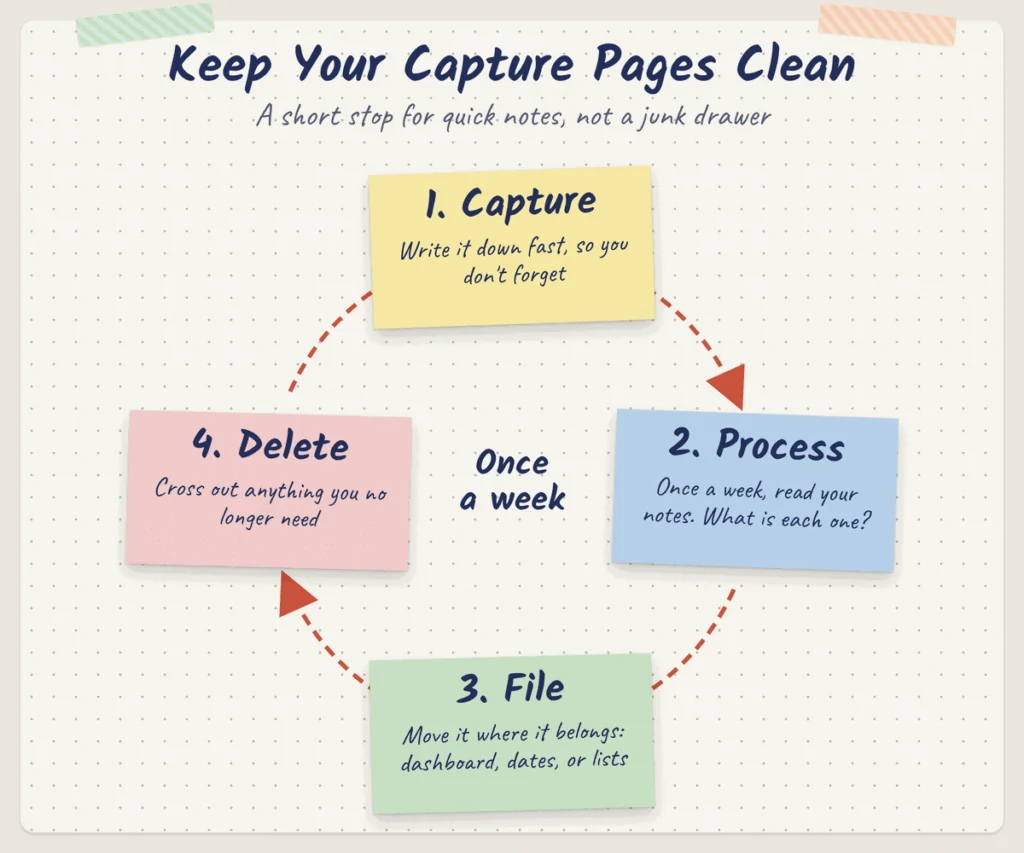
fast. A phone number, an idea, a task, a name.
But be careful. These pages can turn into a junk drawer. You know the drawer I mean. The one full of random stuff where nothing can be found.
To stop that, I use a simple rule: Capture, Process, File, Delete.
- Capture: write it down fast, so you don’t forget.
- Process: once a week, read through your notes. What is each one?
- File: move it to where it belongs. A task goes to your dashboard. A date goes to your dates page. A book goes to your book list.
- Delete: cross out anything you no longer need.
When I follow this rule, my capture pages stay clean. They are just a short stop, not a forever home.
Section 13: Monthly Review
At the end of each month, I take 20 minutes to look back. I sit with a cup of tea and my notebook, and I answer six questions.
- What worked? What went well this month?
- What didn’t work? What was hard or did not go to plan?
- What is unfinished? What do I need to carry over?
- What needs attention? Is anything slipping?
- What can I remove? Any tasks, plans, or habits I can drop?
- What matters next month? What is my focus going forward?
This habit is what keeps the whole notebook alive. Without it, pages get old and the book stops being useful. With it, everything stays fresh.
And it feels good to see how far you came. Even small wins add up.
Section 14: Lessons and Useful Discoveries
This is a page for things you learn. Not from books. From your own life.
Here is what I write down:
- What worked: like “packing lunch the night before saves my mornings.”
- What didn’t work: like “trying to work out at 5 AM just made me tired.”
- Helpful processes: steps for jobs I do now and then, like how to reset the router.
- Mistakes to avoid: like “always check the return policy before buying.”
- Useful finds: a great shop, a handy app, a quick dinner idea.
Over a year, this page turns into a small book of your own wisdom. It stops you from making the same mistake twice. And that is worth a lot.
Optional Life Notebook Sections
The sections above are the core. But you may want to add a few more, based on your life. Here are some ideas. Only add the ones you will really use.
Travel
Keep packing lists, trip ideas, and prep checklists. A good packing list saves you from that “Did I forget my charger?” feeling at the airport.
Meal Planning
Write down your favorite meals, grocery combos that go together, and easy meals for busy nights. When you don’t know what to cook, just flip to this page.
Home Projects
Track ideas, the materials you need, the costs, and your progress. This keeps big jobs from getting lost or going way over budget.
Personal Development
List skills you want to build, courses you want to take, and simple practice plans. Like “practice guitar 15 minutes a day.”
Reading and Learning
Keep a list of books, notes on what you read, questions you have, and resources you want to check out. It helps the things you learn stick.
How to Arrange Your Life Notebook
There is no one right way to set up your notebook. Here are three options. Pick the one that fits you best.
Option 1: One Notebook
Use a single bound notebook with tabs or sticky flags for each section. It is simple, cheap, and easy to carry. The downside is you can’t move pages around. So leave a few blank pages at the end of each section to grow into.
Option 2: Binder System
Use a ring binder with tab dividers. You can add, remove, and move pages any time. It is great if you like to print templates or change your setup often. It is a bit bulky to carry, though.
Option 3: Notebook plus Digital Calendar
Use a paper notebook for goals, lists, and notes. Use a digital calendar on your phone for dates and reminders. This is what I do. I get the calm of paper and the beeps of a phone. Best of both.
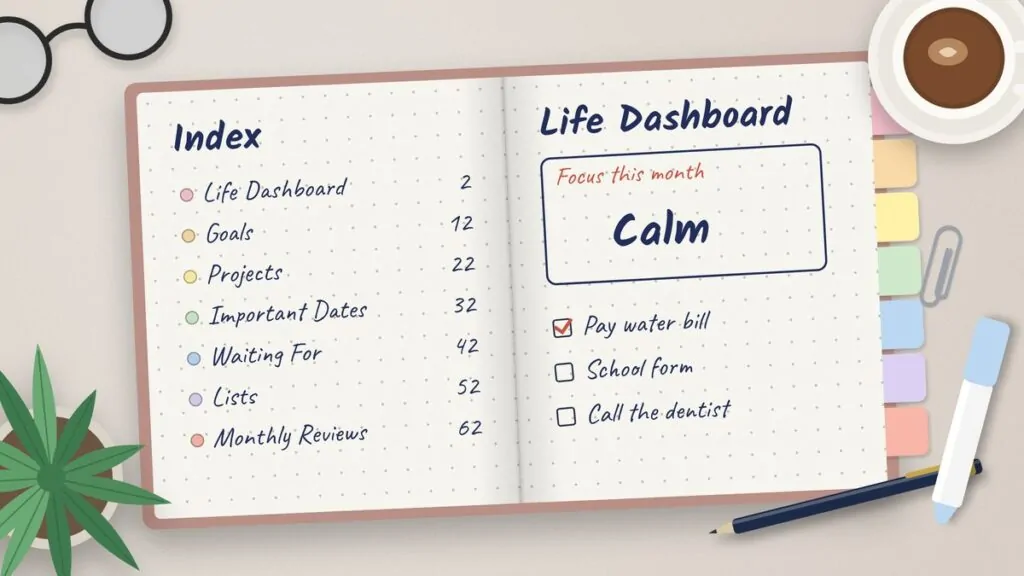
Whatever you pick, add an index page at the front. List each section and its page number or tab color. It makes finding things so much faster.
The “Don’t Put This in Your Life Notebook” List
What you leave out matters just as much as what you put in. Here is my list of things to keep out:
- Passwords: never. A lost notebook could mean lost accounts.
- Sensitive financial credentials: no full card numbers, bank logins, or PINs.
- Info that changes daily: like the weather or daily news. It will be old by tomorrow.
- Hundreds of random notes: if you never sort them, they just bury the good stuff.
- Duplicate calendar entries: if every appointment is in your phone, you don’t need to copy each one here too.
- Info you’ll never use again: old receipts, old to-do lists, notes from a project that ended years ago.
Here is the main idea. Your life notebook should take clutter out of your head. It should not add clutter to your desk. If a page does not help you, it does not belong.
The Minimum Life Notebook: Only 7 Sections
Feeling like 14 sections is a lot? I get it. You don’t need all of them to start.
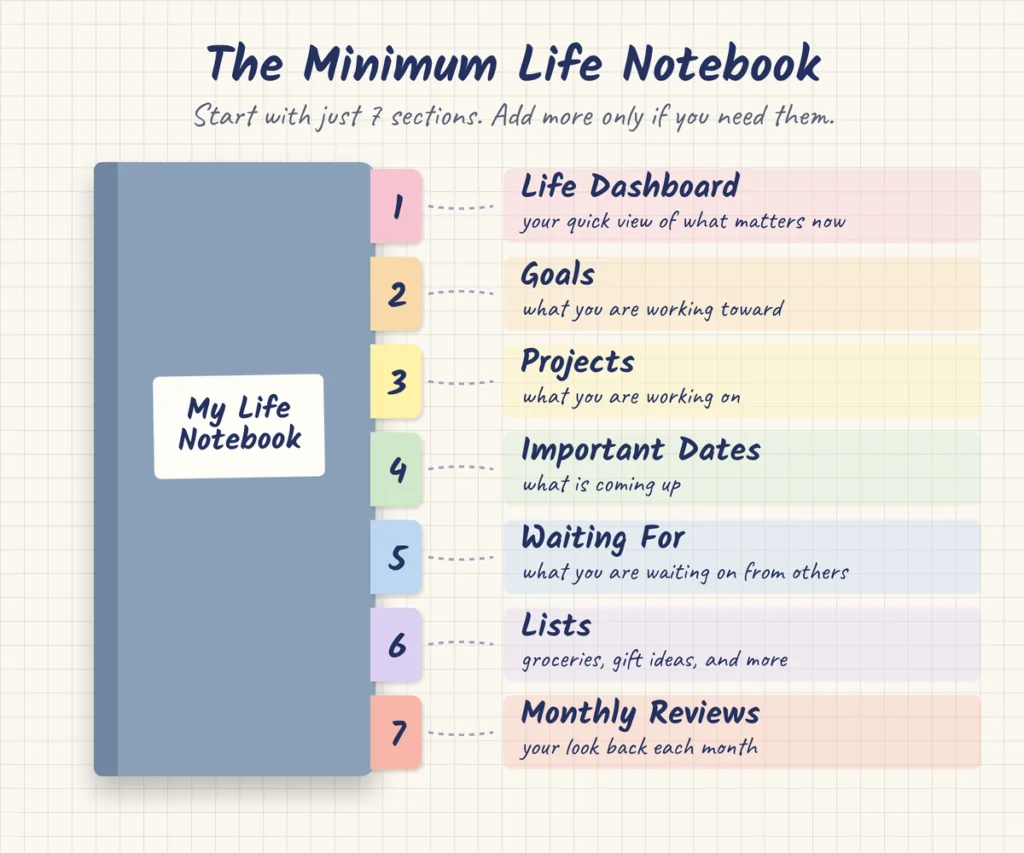
If you want the simple version, here are the 7 sections I would pick:
- Life Dashboard: your quick view of what matters now.
- Goals: what you are working toward.
- Projects: what you are working on.
- Important Dates: what is coming up.
- Waiting For: what you are waiting on from others.
- Lists: your reusable lists, like groceries and gift ideas.
- Monthly Reviews: your look back each month.
Start with these. Use them for a month or two. Then add more sections only if you feel a real need for them.
Life Notebook Setup Checklist
Ready to make yours? Here is a simple checklist. Go step by step, and tick each box as you go.
- [ ] Choose a notebook or binder.
- [ ] Create an index page at the front.
- [ ] Add your Life Dashboard.
- [ ] Add your current goals.
- [ ] Add your active projects.
- [ ] Add your important dates.
- [ ] Add a Waiting For page.
- [ ] Add your household info.
- [ ] Add your useful lists.
- [ ] Add monthly review pages.
- [ ] Remove any sections you don’t use.
That last step is the one most people skip. But it is key. A lean notebook is a used notebook.
FAQs
What should I put in a life notebook?
Put in the info and plans you use most. A dashboard, your goals, projects, key dates, a waiting list, home info, reusable lists, and a monthly review. Leave out passwords and anything you will never look at again.
How many sections should a life notebook have?
Seven is a great place to start. You can grow to 14 or more if you need them. But only add a section if you will really use it.
Is a life notebook the same as a planner?
Not quite. A planner is mostly about dates and daily plans. A life notebook holds more than that. It has goals, lists, home info, and notes you can look up any time. Some people use both together.
Should I use a notebook or a binder?
A notebook is simple and easy to carry. A binder lets you add and move pages. If you like to change things often, go with a binder. If you want simple, go with a notebook.
What should I write in my life planner?
Write your top goals, the next step for each one, your key dates, your weekly tasks, and a short review each month. Keep it focused on what you will act on.
How do I organize a life notebook?
Start with an index page. Then put your most used sections at the front, like the dashboard and goals. Use tabs or colors to mark each section. And clean it out once a month.
Is a digital or paper life notebook better?
Both can work. Paper is calm and helps many people think and remember. Digital is easy to search and gives you reminders. A lot of people, me too, use paper for notes and a digital calendar for dates.
How do I keep my life notebook from getting cluttered?
Use the Capture, Process, File, Delete rule for quick notes. Do a monthly review. Move done projects out. And remove any section you have not used in a while.
Your life notebook does not need to be pretty or perfect. It just needs to work for you. Start with a few sections, use them each wee/imagek, and let the book grow as your life does.