How to Use a Calendar to Organize My Life

My brain used to be my calendar. I tried to keep every date, every bill, and every “don’t forget” in my head. And you can guess how that went. I missed a dentist visit. I forgot a friend’s birthday. I paid a late fee I did not need to pay.
Then I started to use my calendar in a new way. Not just for meetings. For my whole life. And it changed so much for me.
Think of your calendar as a second memory that lives outside your head. Your brain is great at ideas. It is not so great at holding a long list of dates and times. When you put those on a calendar, your mind gets to rest.
But there is a big mistake a lot of people make. They throw everything into one calendar. Work calls, gym, kid stuff, bills, “buy milk,” and “call mom” all pile up in one spot. Soon, the calendar is so full that you stop looking at it.
To fix this, it helps to know that not all items are the same. There are four kinds:
- Events: things that happen at a set time and place. Like a doctor visit at 3 PM.
- Tasks: things you need to do, but at any time. Like “buy a gift.”
- Reminders: a nudge at the right time. Like “take out the trash tonight.”
- Information: things you just need to know. Like a door code or an address.
Only some of these belong on your calendar. In this post, I will show you how to sort them out. I will also share an idea I call the Calendar as a Life Map. Your calendar is not just a list of meetings. It is a map of how you spend your time, your days, and your life.
What Should Actually Go on Your Calendar?
Here is my simple rule. If it has a time, it goes on the calendar. If it does not, it most likely goes on a task list.
Things that should go on your calendar:
- Fixed events: things with a set time that can’t move. Classes, meetings, flights, doctor visits.
- Flexible commitments: things you said yes to that can shift a bit. Lunch with a friend, a call with your sister.
- Time blocks: time you save for one kind of work. Like “write report, 9 to 11 AM.”
- Personal routines: the things you want to protect. A walk, gym time, or family dinner.
Things that should not clutter it:
- Small tasks with no set time, like “clean the desk.”
- Long notes or info you just need to save.
- Ideas you might do one day.
- Every tiny thing you do in a day, like “brush teeth.”
When your calendar only holds what really needs a time, it gets so much easier to read. You look at it, and you know right away what your day is.
Create Calendar Categories That Match Your Life
Most calendar apps let you make more than one calendar, or use colors. This is so helpful. But keep it small. Too many colors just make a rainbow mess.
I use six groups. You may need fewer.
- Work or School: meetings, classes, shifts, and work blocks.
- Personal: time with friends, hobbies, the gym, and rest.
- Home: cleaning, repairs, and home jobs.
- Family: kid events, school plays, family dinners.
- Appointments: doctor, dentist, car shop, hair cut.
- Important deadlines: due dates for bills, taxes, forms, and projects.
Give each one its own color. Then one quick look tells you a lot. If your week is all one color, like all work, you know you need to make room for the rest of your life.
A small tip: if you share a calendar with a partner, a shared Family or Home calendar is great. You both see the same plans. Fewer “I didn’t know about that!” talks.
Build Your Calendar From the Outside In
When I set up a new week or month, I don’t just add things as they come. I add them in a set order. I call it outside in. You start with what can’t move, and end with what can.
- Fixed commitments. Work hours, school, classes, and set appointments. These go in first, since they can’t move.
- Deadlines. When is that bill due? That form? That project? Add them next.
- Recurring duties. Things that come up each week. Like kid pick ups, trash day, or a weekly call.
- Personal priorities. The things that matter most to you. Gym, family time, a hobby, sleep.
- Flexible activities. Last, add the stuff that can go in any open slot. Errands, chores, fun plans.
Why this order? Because if you add the flexible stuff first, it fills up your space. Then when a fixed thing comes along, you have to shove things around.
It is like filling a jar. Put the big rocks in first. Then the small stones. Then the sand. If you start with sand, the big rocks won’t fit.
Add Your “Invisible” Responsibilities
Here is something that blew my mind. Many of the things that eat our time never make it to the calendar. They are hidden.
Things like:
- Time to get ready before you leave.
- Travel time to and from places.
- Grocery runs.
- Laundry.
- Home upkeep, like dishes and tidying.
- Admin stuff, like paying bills, filling out forms, and replying to mail.
- Recovery time, the time you need to rest after a big day.
When these are not on the calendar, your day looks empty. But it is not. So you say yes to too much, and then you wonder why you are always behind.
Try a Hidden-Time Audit
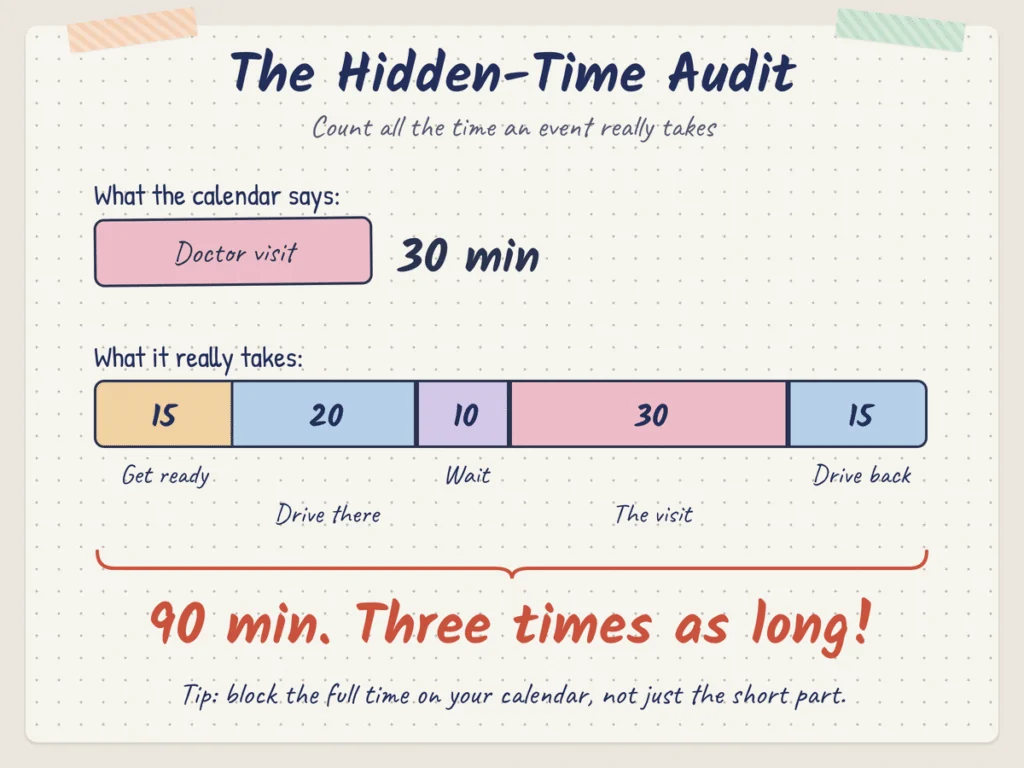
Here is a simple test. Pick one thing on your calendar, like a 30-minute doctor visit. Now count all the time it really takes.
- Get ready to leave: 15 minutes.
- Drive there: 20 minutes.
- Wait in the lobby: 10 minutes.
- The visit itself: 30 minutes.
- Drive back: 15 minutes.
That is 90 minutes. Not 30. Three times as long!
Do this for a few of your usual events. You will see where your time really goes. Then you can block the full time on your calendar, not just the short part.
Use Time Blocks Without Scheduling Every Minute
A time block is a chunk of time you save for one kind of thing. It is a great tool. But you don’t need to plan every minute of your day. That just makes you feel trapped.
I use five kinds of blocks:
- Deep-work blocks: time for hard, focused work. No calls, no email. I like 60 to 90 minutes.
- Admin blocks: time to clear small jobs. Email, bills, forms, quick calls.
- Errand blocks: one trip out to do all the errands at once. Bank, store, post office.
- Personal blocks: time just for you. A walk, a book, a nap, a hobby.
- Buffer blocks: empty time on purpose, to catch things that run late.
I only use a few blocks each day. The rest of the time is open. That gives me a shape for my day, but still lets me breathe.
Think of blocks like rooms in a house. Each room has a job. But you don’t need to say where every chair goes.
Create Buffer Time Between Commitments
If I could give you just one tip, it would be this: leave gaps.
When you stack things back to back, one small delay makes the whole day fall like a row of blocks. A meeting runs 10 minutes long, and now you are late for the next three things.
Here are four kinds of buffers I use:
- Travel buffer: extra time on top of the drive, for traffic or parking.
- Transition buffer: a few minutes to switch from one task to the next. Grab water, use the bathroom, reset your mind.
- Surprise-task buffer: open time for the stuff that pops up. And something always pops up.
- Recovery buffer: rest time after something big, like a long trip, a hard talk, or a big test.
I try to leave 10 to 15 minutes between most things. For big events, I leave more. It feels like a waste at first. But it is not. It is what keeps your day calm.
Use Recurring Calendar Events for Life Maintenance
Some jobs come back again and again. Instead of trying to remember them, set them once as a repeat event. Then your calendar does the remembering for you.
Here are the ones I have set up:
- Weekly reset: Sunday at 5 PM. I look at my week and tidy up the house.
- Monthly money review: the 1st of each month. I check my bills, my budget, and my savings.
- Subscription review: every three months. I look at what I pay for and cancel what I don’t use.
- Home upkeep: once a month. Check the smoke alarms, change filters, clean the fridge.
- Digital cleanup: once a month. Clear old files, photos, and emails.
- Planning sessions: a short one each week, and a longer one each month.
Set them once, and you are done. When the reminder pops up, you just do it. No need to think, “Wait, when did I last change that filter?”
Create a “Preparation Event” Before Important Events
This little trick has saved me so many times. Before any big event, I add a short prep event.
Here is an example:
- Doctor visit at 3:00 PM.
- Prep at 2:30 PM: write down my questions, grab my ID and insurance card.
Without the prep event, I would rush out the door and forget half of what I wanted to ask. With it, I walk in calm and ready.
You can do this for lots of things:
- Travel: a day before, pack and check your tickets.
- Exams: a few days before, set study time.
- Meetings: 15 minutes before, read your notes.
- Presentations: a day before, practice out loud.
- Birthdays: a week before, buy a gift and a card.
- Important calls: 10 minutes before, write down what you want to say.
The event tells you when. The prep event makes sure you are ready.
Create a Calendar for Your Future Self
Your calendar is not just for this week. It can help the you of next month, and next year too.
I like to think of it as a gift to my future self. When I learn about a date far away, I add it right then. So future me does not get caught off guard.
Here is what I add:
- Renewals: driver’s license, passport, car tags, insurance. Add a reminder a month or two before.
- Yearly appointments: check ups, eye exams, the car’s yearly service.
- Deadlines: taxes, school forms, work due dates.
- Seasonal tasks: swap clothes, clean the gutters, get the heater checked.
- Recurring payments: yearly fees, like an app or a club that bills once a year.
- Birthdays: friends, family, and anyone you care about. Set them to repeat each year.
The trick is to set the reminder early. A passport can take weeks to renew. If the reminder pops up the day it ends, it is too late. Give future you some time.
Calendar vs. To-Do List: What Goes Where?
This is the part that confuses a lot of people. Should a task go on the calendar, or on a to-do list? Here is a simple chart.
| Calendar | Task List |
|---|---|
| Appointment | Buy groceries |
| Meeting | Research topic |
| Exam | Clean desk |
| Flight | Reply to email |
| Deadline | Organize files |
See the pattern? The left side has a set time. The right side can be done any time.
But some tasks do need a spot on the calendar. When does a task earn a time block? I ask these questions:
- Will it take more than 30 minutes?
- Does it need my full focus?
- Have I been putting it off for a long time?
- Does it have a deadline coming up soon?
If the answer is yes to one or more, I give it a block. For example, “research topic” might sit on my list for weeks. But if I block 2 to 3 PM on Tuesday for it, it gets done.
Small, quick tasks stay on the list. Big, important ones get a time.
Create a Weekly Calendar Reset
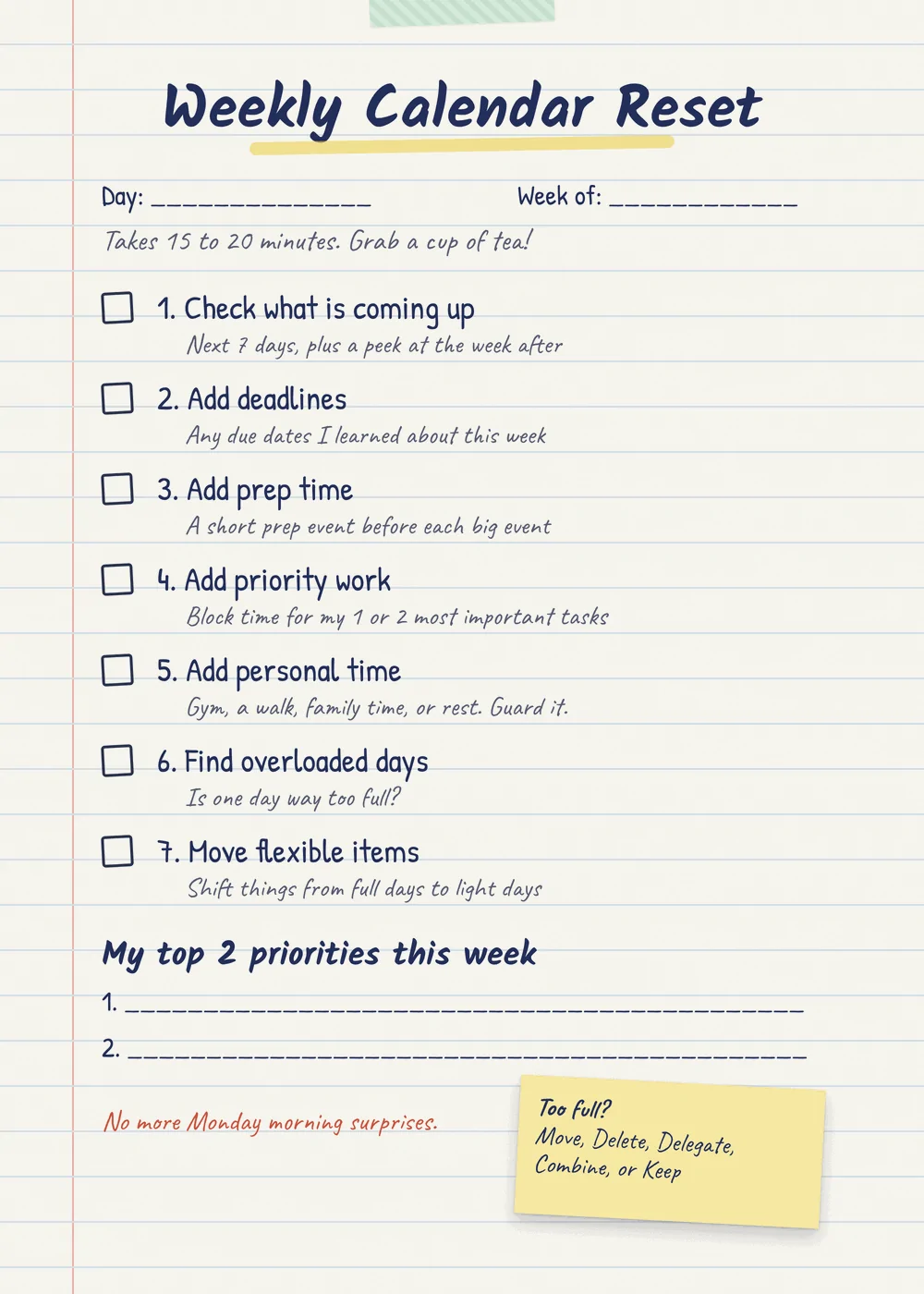
Once a week, I sit down for 15 to 20 minutes and look at the week ahead. This is the habit that holds the whole system together.
I do it on Sunday, but any day works. Here are my steps:
- Check what is coming up. Look at the next 7 days, and a peek at the week after.
- Add deadlines. Any due dates I learned about this week.
- Add prep time. For each big event, add a prep event before it.
- Add priority work. Block time for the one or two most important tasks.
- Add personal time. Gym, a walk, family time, or rest. Guard it.
- Find overloaded days. Is one day way too full? Look for it.
- Move flexible items. Shift things from full days to light days.
That is it. Twenty minutes, and I start the week knowing what is coming. No more Monday morning surprise.
What to Do When Your Calendar Gets Overloaded
It happens to all of us. You look at a day, or a week, and it is just too much. Here is what I do. I go through each item and pick one of five choices.
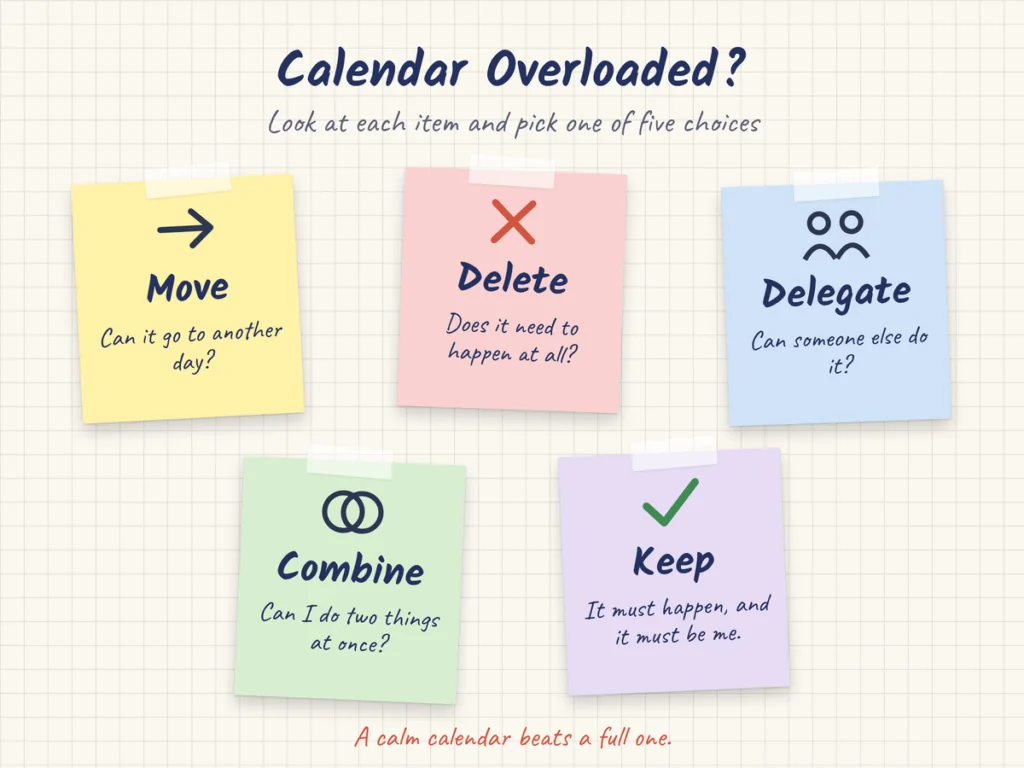
- Move: Can it go to another day? Most flexible items can.
- Delete: Does it need to happen at all? Some things can just go.
- Delegate: Can someone else do it? A partner, a kid, a co-worker, or a paid service.
- Combine: Can I do two things at once? Like a call while I walk, or all errands in one trip.
- Keep: It must happen, and it must be me. Then it stays.
You will be amazed how much you can clear. Most of the time, I can free up an hour or two just by asking these five questions.
And it is okay to say no. A full calendar is not a badge of honor. A calm one is.
Calendar Rules That Prevent Chaos
These are the rules I live by. They keep my calendar useful and not scary.
- Don’t fill every minute. Leave open space. Life needs room.
- Never forget travel time. If you have to go somewhere, block the drive too.
- Your calendar is not a dumping ground. Only things with a time go on it. Put the rest on a list.
- Look at tomorrow before bed. Just one minute. You will sleep better and wake up ready.
- Add prep time for big events. Be ready, not rushed.
- Protect empty space. Free time is not wasted time. It is time to rest, think, and catch up.
Pick one or two of these to start. Once they feel easy, add more.
10-Minute Calendar Setup
Want to get started right now? Here is a quick setup you can do in about 10 minutes.
- Pick one calendar app. Use one you already have, like the one on your phone. Just one, so you only check one place. (1 minute)
- Make your color groups. Set up 3 to 6, like Work, Personal, Home, Family. (2 minutes)
- Add your fixed events. Work hours, classes, set appointments for the next two weeks. (2 minutes)
- Add the next few deadlines. Bills, forms, and due dates. (1 minute)
- Add birthdays. Start with your closest five people. Set them to repeat. (1 minute)
- Set one repeat event. A weekly reset on Sunday. (1 minute)
- Add one personal block. Some time this week just for you. (1 minute)
- Turn on reminders. Set alerts for big events, like a day before and an hour before. (1 minute)
Done. It is not perfect, and it does not need to be. You can add more each week as you go.
FAQs
How can I use my calendar to organize my life?
Put anything with a set time on it. Use a few color groups for each part of your life. Add prep time, travel time, and buffer time. Set repeat events for upkeep jobs. And do a short weekly reset to plan the week ahead.
Should tasks go on my calendar?
Small tasks should go on a to-do list. But big tasks, or ones you keep putting off, can get a time block on your calendar. That gives them a real spot in your day so they get done.
How many calendars should I have?
Keep it to one app, with a few color groups inside it. Three to six groups is plenty for most people. More than that gets hard to read.
How do I organize a busy calendar?
Go through each item and pick: move, delete, delegate, combine, or keep. Add buffers between things. And build your week from the outside in, starting with what can’t move.
How far ahead should I plan?
Plan the details one week at a time. Look one month ahead for bigger things. And add yearly dates, like birthdays and renewals, as soon as you know them.
Should I schedule my daily routine?
You don’t need to schedule every part of it. But it helps to block the parts that matter most and tend to get pushed out, like exercise, quiet time, or family dinner. If it is on the calendar, it is more likely to happen.
Your calendar can be so much more than a list of meetings. Use it as a map of your life. Start small, check it each day, and let it carry the load so your mind can rest.