7 Best PC Casing Picks That Will Make Your Evenings So Much Better
Disclosure: This article contains affiliate links. If you make a purchase through these links, we may earn a small commission at no extra cost to you. See our Affiliate Disclosure

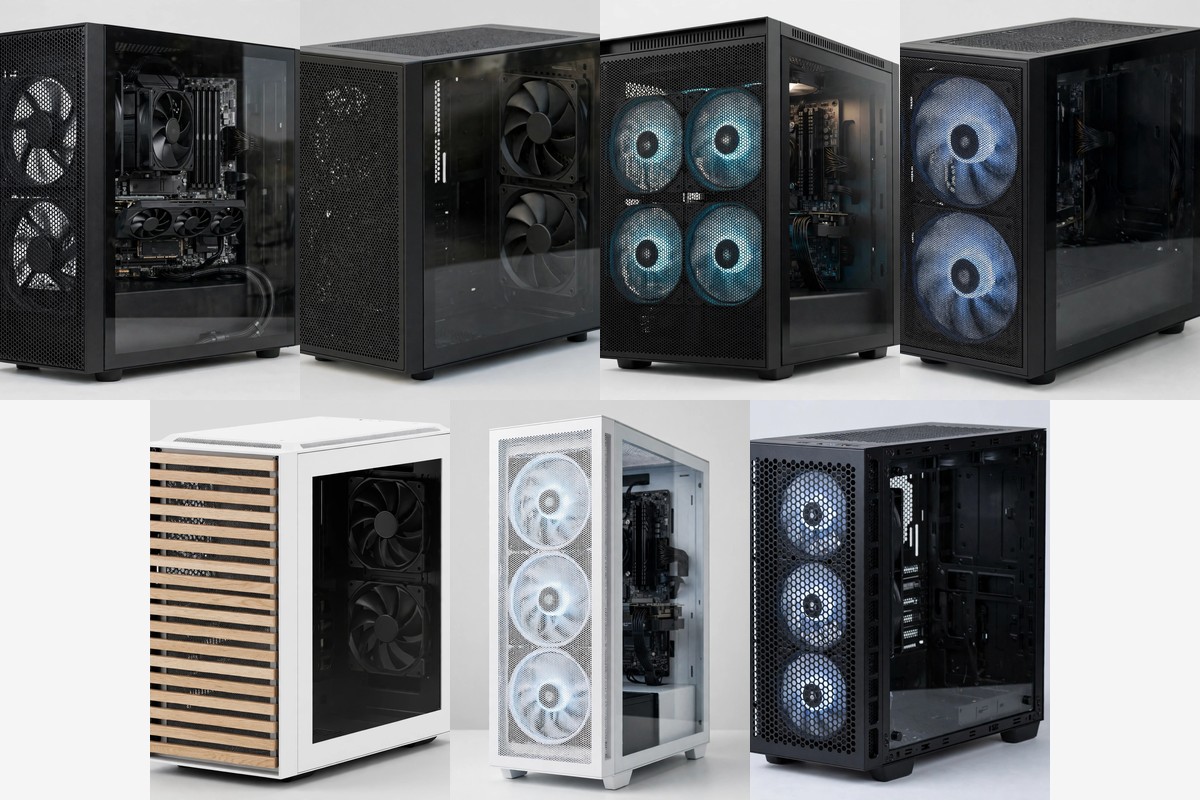
Your evenings feel better when your computer just works and looks good doing it. A good case keeps parts cool, keeps wires tidy, and gives you room to build without a fight. I spent time comparing the top cases that builders keep picking this year, and the seven below stood out for airflow, space, and simple builds. Pick the one that fits your desk, your parts, and your style, and the rest of your build gets much easier.
A case is not just a box. It sets how cool your parts run, how loud your fans sound, and how much room you have when you add new parts later. A tight case with weak airflow can make a strong computer run hot and loud. A roomy case with a mesh front lets air flow in and out with ease. That is why this list leans hard toward mesh fronts, good fans in the box, and clear room for long graphics cards.
Before you pick, check three things. First, your motherboard size, because a small case will not fit a big board. Second, your graphics card length, because long cards need real room. Third, your cooler plan, because a big air cooler or a liquid cooler needs its own space. Every case below states what it fits, so you can match it to your parts in a few minutes. When the fit is right, the build feels calm instead of rushed.
Quick Picks
| Pick | Case | Best for |
|---|---|---|
| 1 | Corsair 4000D Airflow | A proven all round mid tower |
| 2 | NZXT H5 Flow 2024 | A compact tower with strong GPU cooling |
| 3 | Montech AIR 903 MAX | Four big fans and great value |
| 4 | Lian Li LANCOOL 216 RGB | Huge front fans and mesh on all sides |
| 5 | Fractal Design North Chalk White | A calm wood look for the living room |
| 6 | NZXT H7 Flow 2024 | Bottom fans that feed the graphics card |
| 7 | Corsair FRAME 4000D RS ARGB | A modular case that grows with you |
1. Corsair 4000D Airflow
This is the safe pick that so many builders start with because it gets the basics right. The steel front panel is full of small holes, so cool air flows straight in to your parts. Two 120mm fans come in the box, and they push air in a focused stream instead of letting it drift. That simple design keeps temps low without a lot of fuss or extra parts to buy.
Building inside this case feels calm because the cable channel does a lot of the work for you. Corsair calls it RapidRoute, and it gives your main cables one clear path behind the board. You get 25mm of room back there, so thick cables sit flat and the side panel closes with ease. A tidy back means a tidy front, and that helps air move with no blocks in the way.
Room is generous for a mid tower. You can fit radiators up to 360mm in the front and 280mm in the roof, so a liquid cooler has a clear home. The case takes up to six 120mm fans or four 140mm fans, so you can add cooling later if your parts get hotter. Storage covers two SSDs and two hard drives, which is plenty for most home builds.
The tempered glass side shows off your build without making the case feel fragile. Panels come off with ease, and the dust filters help keep the inside clean over time. First time builders like this case because screws, trays, and mounts sit where you expect them. Nothing hides in a strange spot, and the manual makes sense.
Airflow is the star here, and it shows in daily use. Your fans do not need to spin hard to keep things cool, so the whole desk stays quiet in the evening. Long work sessions, late games, and long video calls all feel the same, with steady air and no hot spots. It is a case that fades into the back of your day and just lets you enjoy your computer.
Looks stay clean and plain in a good way. The black steel front suits almost any desk, and the glass side lets your parts do the talking. You can add lights later if you want them, or you can keep it dark and simple. Either way, the case looks neat from across the room.
Upgrades are easy too, because the layout leaves room to swap parts one at a time. A new graphics card, a new cooler, or more storage all slide in without a full rebuild. That matters when you want your evenings to stay fun and not turn into a long repair job. This case grows with you, step by step.
For most people, this is the one to beat. It cools well, builds easy, and holds a full size system with room to spare. If you want one case that does almost all jobs well, start here and you will not feel stuck later.
| Pros | Cons |
|---|---|
| ✓ Strong mesh airflow from the front panel | ✕ Only two fans in the box |
| ✓ Easy cable channel for a tidy build | ✕ Plain look with few color choices |
| ✓ Room for big radiators and long cards | |
| ✓ Glass side shows off your parts | |
| ✓ Simple layout for first time builders |
2. NZXT H5 Flow 2024
Small desks love this case because it keeps a full size board in a neat, compact shell. The front, top, and side panels are full of tiny holes, so air moves in from more than one side. Two 120mm fans come fitted, and they give you a solid start on day one. Your build stays cool even though the case does not take over your desk.
The clever part sits under the graphics card. The power supply shroud has holes in it, so two extra fans can push fresh air straight up to the card. Hot cards are often the loudest part of a build, and this direct air helps them stay calm. If you play games in the evening, that means less fan noise while you play.
Radiator support is strong for a compact case. You can fit a 360mm radiator in the front and a 240mm radiator on top, so liquid cooling is a real option. The case still fits tall CPU coolers and long graphics cards, which keeps your part choices wide open. Cable channels behind the board help you route wires with ease.
Looks are clean and quiet, with a plain black shell and a clear glass side. Nothing shouts for attention, and the case blends in next to a monitor and a desk lamp. Builders who like a tidy desk will enjoy how little space it takes. It looks like a normal part of the room, not a big machine.
Building in a smaller case can feel tight, but this one plans the space well. Panels lift off with ease, and the inside layout keeps drives and cables out of the main airflow path. Take your time, fit one part at a time, and the build comes together with no stress. A little care at the start saves a lot of rework later.
Cooling stays steady because the mesh panels do not block air the way solid glass fronts do. Fresh air comes in, warm air goes out, and your parts hold a stable temp through long sessions. That steadiness helps your computer last longer and run smooth for years. It is a small case with a big focus on air.
Storage and ports cover daily needs with ease. You get room for your main drives and front ports for quick plug in jobs. The glass side lets you check your build at a glance, so dust or loose cables are easy to spot. Simple checks like that keep a build healthy.
For a compact desk or a first build in a small room, this case is hard to beat. It cools the graphics card well, fits full size parts, and stays neat. Pick it when space is tight but you still want strong airflow.
| Pros | Cons |
|---|---|
| ✓ Compact size suits small desks | ✕ Tight room for very large coolers |
| ✓ Mesh on three sides for strong airflow | |
| ✓ Bottom fans feed fresh air to the graphics card | |
| ✓ Fits 360mm front and 240mm top radiators |
3. Montech AIR 903 MAX
Four fans in the box make this case a great start because you do not need to buy more fans on day one. Three 140mm fans sit in the front and one 140mm fan sits at the back, so air flows in a clear path from front to rear. The front panel is mostly mesh, which lets a lot of air in with ease. Your parts stay cool from the first boot, and that is a nice feeling.
I like how much room this case gives for the size. It fits E-ATX boards as well as normal ATX boards, and graphics cards up to 400mm long slide in with space to spare. Tall CPU coolers up to 180mm fit too, so big air coolers are fine. When parts fit with room left over, the build feels relaxed and future upgrades stay simple.
Cooling options go far beyond the four fans in the box. You can fit 360mm radiators in the front and on top, and up to nine fans in total if you ever want them. A fan hub sits in the back, so wiring extra fans takes less time and looks tidier. That hub is a small touch that saves a lot of cable mess.
The glass side panel shows your build, and the mesh front keeps the look sporty without being loud. Lights on the front fans add a soft glow that suits an evening desk setup. You can tune fan speed to trade a little noise for more cooling, or set a quiet curve for late night work. Control stays in your hands.
Cable room is good, with cutouts placed where your main wires need to go. The power supply sits under a shroud, so the main chamber stays clean and air flows free. Hard drives and SSDs tuck away out of sight, which keeps the front view neat. A clean inside is not just for looks, because it helps air reach the parts that need it.
Dust filters on the mesh panels help keep the inside clean between deep cleans. You can pull them off, rinse them, and put them back in a few minutes. That small habit keeps fans quiet and temps low over months of use. A case that is easy to clean is a case you will actually keep clean.
Front ports include a Type-C port, so new drives and phones plug in with ease. The power button and audio jacks sit in a spot that is easy to reach on a desk. Small details like that matter when you use the case every day. You notice good ports far more than you notice fancy specs.
For builders who want max cooling with no extra fan shopping, this case is a strong pick. It packs four big fans, fits large parts, and leaves room for liquid cooling later. Pick it when you want a cool, roomy build that is ready to go out of the box.
| Pros | Cons |
|---|---|
| ✓ Four large fans included in the box | ✕ Larger than most mid towers |
| ✓ Mesh front with a high ventilation rate | ✕ Few color choices |
| ✓ Fits E-ATX boards and 400mm graphics cards |
4. Lian Li LANCOOL 216 RGB
Big fans make a big difference, and this case uses two huge 160mm fans in the front. Large fans move a lot of air at low speed, so cooling stays strong while noise stays low. A 140mm fan at the back pulls warm air out, and mesh panels on the front, top, and power supply shroud let air flow from all sides. It is a case built around air first.
The rear fan bracket is a neat trick that many cases skip. It lets you mount a fan behind the graphics card area to push air where hot parts need it most. That extra path helps when you run long sessions with a strong graphics card. Small design wins like this add up to a cooler, quieter desk.
Space inside is generous. Graphics cards up to 392mm fit, CPU coolers up to 180mm fit, and up to ten fans can mount in total. The motherboard tray can shift up or down, so you can tune the layout for air cooling or liquid cooling. That flex helps when you change coolers later and do not want to buy a new case.
Build quality feels solid, with a steel frame and a thick glass side panel. Panels fit tight and do not rattle, and the mesh feels firm to the touch. A case that feels solid on day one tends to stay nice for years. You open it less to fix rattles and more to add parts you actually want.
Looks are bold but not loud. The RGB front fans glow softly through the mesh, and the black frame keeps the whole thing calm. If you like lights, they are there from the start. If you want them off, one setting quiets the whole look. Your desk can match your mood.
Cable management gets real help from wide cutouts and room behind the board. Thick power cables route flat, and drive cables tuck out of the airflow path. When cables sit right, the glass side shows a clean build instead of a tangle. That clean view makes the whole setup feel more pro.
Cooling for storage and drives stays good too, because air reaches the whole chamber and not just the front. Warm air has clear exits at the back and top, so heat does not pool in corners. That steady flow helps all parts, not just the big ones. A balanced case cools the small parts as well.
For builders who want top tier airflow with big, quiet fans, this case is a joy. It fits large parts, offers a clever rear fan mount, and looks great on a desk. Pick it when cooling matters most and you want fans that do not shout.
| Pros | Cons |
|---|---|
| ✓ Two huge 160mm front fans move lots of air | ✕ Heavier than many mid towers |
| ✓ Mesh on front, top, and shroud sides | |
| ✓ Clever rear fan bracket for extra cooling | |
| ✓ Room for up to ten fans in total | |
| ✓ Shiftable board tray for air or liquid cooling |
5. Fractal Design North Chalk White
Some cases look like machines, and this one looks like furniture in the best way. Real oak slats run across the front, with brass details that catch the light in a soft way. The chalk white body keeps the whole thing bright and calm next to a desk or a bookshelf. If your computer sits in a living room, this case blends in with ease.
Looks do not come at the cost of air. Fine mesh sits behind the wood slats, so air still flows in while the front keeps its warm style. Two 140mm fans come fitted, and they push a steady stream through the case. Your parts stay cool while the case stays quiet and pretty, which is a rare mix.
Fit covers most home builds with ease. Graphics cards up to 355mm fit with front fans in place, and up to 300mm fit when a 360mm front radiator takes that space. The top fits a 240mm radiator, so liquid cooling works for moderate builds. ATX, micro ATX, and mini ITX boards all fit, which keeps your options open.
Panels open with a simple tab, so you can get inside without tools or a fight. The side, front, and top panels lift off in a smooth way that makes cleaning feel easy. When a case is easy to open, you clean it more often, and clean parts run cooler for longer. That small habit pays off all year.
Inside, the layout feels calm and thought out. Cables route behind the board, drives mount out of sight, and the main chamber stays open for air. Seven expansion slots give room for add in cards and future plans. Nothing feels cramped, even though the case looks slim from the outside.
Front ports sit on top where your hand can reach them with ease. You get a fast Type-C port plus USB ports and an audio jack, so daily plug in jobs take seconds. That top spot also keeps cables off the floor and away from your feet. Small comforts like that make a desk nicer to use.
Noise stays low because the two large fans move air at gentle speeds. Large fans do not need to spin fast to cool well, so evenings stay peaceful. Work calls, study time, and quiet games all benefit from a case that does not hum in the back. It is a case you forget is running, which is the best praise a case can earn.
For a home where looks matter as much as cooling, this case wins hearts. It fits full size parts, cools well through mesh and wood, and looks like it belongs in the room. Pick it when you want your computer to feel like part of your home, not just a tool.
| Pros | Cons |
|---|---|
| ✓ Real oak front looks warm and calm | ✕ GPU room drops with a front radiator |
| ✓ Mesh behind the slats keeps air flowing | ✕ Top radiator limited to 240mm |
| ✓ Tool free panels make cleaning easy | |
| ✓ Quiet large fans for peaceful evenings |
6. NZXT H7 Flow 2024
Graphics cards run hot, and this case attacks that heat head on. Three fans sit in the front, and three more can sit at the bottom to blow fresh air straight up at the card. That bottom air path is the star, because most cases leave the card to fend for itself. Here the card gets its own breeze, and temps drop in a clear way.
Size is tall rather than wide, so the case fits a lot without eating your whole desk. It holds E-ATX boards up to 277mm wide plus normal ATX boards, and graphics cards up to 410mm long. CPU coolers up to 185mm tall fit too, so large air coolers are welcome. A tall case like this gives parts room to breathe.
Radiator support is big. The front takes up to 420mm, and the top takes up to 360mm, so serious liquid cooling fits with ease. Up to ten fans can mount in total, which means you can tune airflow for almost any build. Start with the three front fans, then add bottom fans when your card needs more air.
Cable space is generous, with 34.5mm of room behind the board for thick wires. That depth makes the back panel close with ease even when cables pile up. Channels guide the main wires, so the front stays clean and air flows free. A clean back is a quiet win that you feel every time you open the case.
Looks stay minimal, with a plain shell, a perforated front, and a clear glass side. The white version looks fresh and bright, and it suits desks that lean light and airy. Nothing flashy fights for your eyes, so your monitor and your work take center stage. It is a case that looks grown up.
Build ease is good for a tall tower. Panels come off smooth, drives mount in clear spots, and the front fans arrive pre fitted. You can build in stages, test as you go, and add cooling later without pulling all parts out. That staged path suits first time builders who want to learn as they build.
Airflow through the perforated panels stays strong in daily use. Fresh air enters from the front and bottom, warm air exits at the back and top, and the whole loop runs steady. Long evenings of work or play feel the same from start to end, with no slow heat buildup. Stable air means stable speed, and that keeps your computer feeling fast.
For a builder with a strong graphics card and big cooling plans, this case makes sense. It feeds the card direct air, fits huge radiators, and keeps cables tidy. Pick it when your card works hard and you want it to stay cool and quiet.
| Pros | Cons |
|---|---|
| ✓ Bottom fans cool the graphics card direct | ✕ Tall shape needs vertical desk room |
| ✓ Huge radiator support up to 420mm front | |
| ✓ Deep cable room behind the board |
7. Corsair FRAME 4000D RS ARGB
Most cases stay the same for years, but this one can change as your needs change. The FRAME system lets you swap parts of the case itself, from the motherboard tray to the front panel, as new options arrive. That modular idea means the case can grow with you instead of forcing a full replacement. It is a long term pick for builders who love to tinker.
Fan mounting gets a clever upgrade with the InfiniRail system. Instead of fixed holes, a steel rail lets you slide front and roof fans to the spot where air helps most. Fans up to 200mm fit in the front and up to 140mm fit in the roof, so you can aim air at hot parts with care. That flex is rare, and it makes cooling feel custom.
Three RS ARGB fans come fitted in the front, and they link in a chain so wiring stays short and neat. Each fan has eight lights that you can control from your motherboard, and a Zero RPM mode lets them stop at low loads for near silent use. Quiet evenings and bright builds can live in the same case, and you pick which one each night.
Radiator room covers dual 360mm mounts, so two large liquid coolers can fit at once. The 3D Y pattern front panel is full of holes in three directions, which lets air in with very little block. Long graphics cards fit with room to spare, and a small arm holds the card up so it does not sag over time. That arm saves your card slot from slow strain.
Reverse connector boards get full support here, which matters for the newest tidy builds. Boards with plugs on the back hide their cables out of sight, and this case gives them the room they need. If you plan a clean build with hidden wires, this case is ready for it today. Future board styles will not catch it out.
Storage stays flex, with trays for two hard drives or four SSDs that you can remove for more cooling room. Pull a tray out, fit a radiator in, and the case adapts in minutes. That swap friendly design suits builders who change parts often. Your case should bend to your plan, not the other way round.
Looks are clean and dark, with a glass side that shows your parts and lights with pride. The black steel frame suits any desk, and the ARGB fans add color without clutter. It looks smart in a home office and fun in a game room, which is a hard mix to nail. This case pulls it off with ease.
For a builder who wants one case for many years and many builds, this is the forward pick. It swaps parts, slides fans where they help, and supports new board styles. Pick it when you want a case that keeps up with you instead of holding you back.
| Pros | Cons |
|---|---|
| ✓ Modular frame swaps parts as needs change | ✕ Takes a few minutes to learn the rail system |
| ✓ Slide fans to the exact spot they help most | ✕ Few color choices |
| ✓ Three ARGB fans with quiet Zero RPM mode | |
| ✓ Dual 360mm radiator support | |
| ✓ Anti sag arm guards the graphics card slot |
Key Takeaways
- Mesh fronts beat solid fronts for cool, quiet builds.
- Match the case to your board size, card length, and cooler plan before you buy.
- Fans in the box save you extra shopping and setup time.
- Bottom fans and direct card airflow help hot graphics cards stay calm.
- Big fans move more air at low speed, so evenings stay quiet.
- A tidy cable path keeps air flowing and the glass side looking clean.
- Modular cases and wide radiator support make future upgrades simple.
Conclusion
A good case turns a chore build into a calm evening project. Air flows free, wires sit flat, and parts fit with room to spare, so you spend less time fixing and more time enjoying your computer. Each case above solves a different need, from a small desk to a big cooling plan to a living room look. Match the case to your parts first, then to your taste, and the choice gets clear fast.
If you want one safe pick, the Corsair 4000D Airflow covers most builds with ease. If your desk is small, the NZXT H5 Flow keeps full size parts in a neat shell. If you want fans ready to go, the Montech AIR 903 MAX brings four big ones. If cooling rules your list, the Lian Li LANCOOL 216 and the NZXT H7 Flow both feed air where it counts. I hope one of these seven feels like the right home for your next build, because a happy case makes every evening at your desk a little better.